
%20--%3e%3csvg%20xmlns='http://www.w3.org/2000/svg'%20xmlns:xlink='http://www.w3.org/1999/xlink'%20version='1.1'%20id='Layer_1'%20x='0px'%20y='0px'%20viewBox='0%200%20240%20150'%20style='enable-background:new%200%200%20240%20150;'%20xml:space='preserve'%3e%3cstyle%20type='text/css'%3e%20.st0{fill:%231F70B7;}%20.st1{fill:%23222221;}%20.st2{fill:%23222221;}%20%3c/style%3e%3cg%3e%3cpath%20class='st2'%20d='M165.2,0.2c-41.3,0-74.8,33.5-74.8,74.8c0,1.1,0,2.1,0.1,3.2h59.3l-1.1,6.4H91.1c4.7,36.8,36.1,65.2,74.1,65.2%20c41.3,0,74.8-33.5,74.8-74.8C240,33.7,206.5,0.2,165.2,0.2z%20M177.8,40.1h6.4L182.2,52h7.7l2.1-11.9h6.4l-5.5,31h-6.4l2.3-13.2h-7.7%20l-2.3,13.2h-6.4L177.8,40.1z%20M129.5,71.2H113l5.5-31h6.4l-4.4,25.1h10.1L129.5,71.2z%20M139.9,71.2h-6.4l5.5-31h6.5L139.9,71.2z%20M146.6,55.7c1.8-10.4,7.5-16.1,15.1-16.1c6.7,0,10.2,4.1,9.3,11.5h-6.3c0.3-3.6-1.1-5.5-4-5.5c-3.7,0-6.4,3.5-7.6,10.4%20c-1.2,6.9,0.2,10.3,4.1,10.3c3,0,5.2-2.1,6.1-5.8h-6.7l1.1-6.1H171l-0.8,4.3c-1.5,8.6-6.5,13.1-14.2,13.1%20C148.4,71.8,144.8,66.1,146.6,55.7z%20M151.6,109.2l5.5-31h6.4l-5.5,31H151.6z%20M183.4,109.2h-5.6l-4.6-15.1c-0.3-1-0.7-2.9-1.1-5.5%20c0.1,2.6,0,5.1-0.4,7.4l-2.3,13.2h-6.4l5.5-31h6.2l4.2,14.1c0.4,1.2,0.7,3.1,1.1,5.6c-0.1-2.6,0-5.1,0.4-7.4l2.2-12.3h6.4%20L183.4,109.2z%20M212.9,90h-6.4c0.5-4.5-0.5-6.6-3.2-6.6c-3.5,0-5.8,3.4-7,10.2c-1.2,6.9-0.2,10.2,3.4,10.2c2.9,0,4.6-2.3,5.6-7.2%20h6.5c0,0.2-0.1,0.4-0.1,0.6c-1.4,8.2-6,12.5-13,12.5c-8,0-10.9-5.3-9-16.1c1.9-10.6,7-16.1,14.4-16.1%20C211.2,77.6,214.2,81.8,212.9,90z%20M213.4,46.1L209,71.2h-6.4l4.4-25.1h-6.1l1-5.9h18.6l-1,5.9H213.4z'%3e%3c/path%3e%3cpath%20class='st2'%20d='M59.1,84.5l1.2-6.4h14.3C73,58.9,56.9,43.9,37.4,43.9C16.7,43.9,0,60.6,0,81.3c0,20.6,16.7,37.4,37.4,37.4%20c19.6,0,35.6-15,37.2-34.2H59.1z%20M51.9,84.5H39.8l-2.2,12.3h-6.4l2.2-12.3H21.2l1.2-6.4h12.1l2.2-12.3h6.4L41,78h12.1L51.9,84.5z'%3e%3c/path%3e%3c/g%3e%3c/svg%3e)
DMX Controller
LIGHT-UP PRO
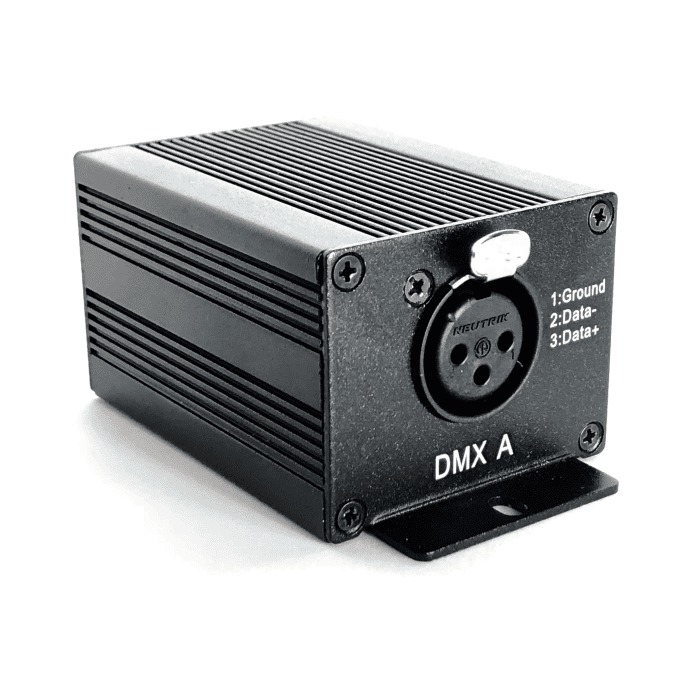
1 XLR Universe; 4 Art-Net Universes; USB Dongle; Stand-Alone
SKU 8718868788207
1 / 9
Product details
With its adaptable interface for live performances, fixed installations, and stand-alone operation, LIGHT-UP Pro innovates lighting control. It offers a user-friendly and sophisticated solution for any lighting project and can be seamlessly integrated into scalable control systems or used independently without a computer.
LIGHT-UP Pro gives you unrivaled control and flexibility with 512 DMX channels directly from the controller and 4 x 512 DMX outputs via Art-Net. Lighting displays that are compelling and dynamic are made possible by the rich effect generator for moving heads and pixel controllers and the built-in timeline for timecoded shows up to 30 minutes. With LIGHT-UP Pro, your go-to tool for amazing lighting experiences, discover the ideal balance of elegance and efficiency.
Specifications
Control
- Stand-alone mode
- Yes, 512 channels, fine DMX channels (16 bits)
- Infrared receiver
- Yes (IR remote control for triggers)
- Infrared functions
- 10 scene selection, scene speed, general dimmer and next scene
- Infrared remote
- No
- Dry contact triggers
- Yes (4 contacts port)
- Next scene button
- Yes
- Signal indicators
- USB LED
- USB mode
- Yes
Power
- Input voltage
- 5 V via USB
- Rated power
- 2 W
Physical
- Dimensions
- H: 48 mm (1,89 in) / W: 70 mm (2,76 in) / D: 89 mm (3,5 in)
- Weight
- 0.16 kg
- Weight (gross)
- 0.34 kg
- Housing
- Strong Aluminum
- Color
- Blue, Black
Protection
- Protection rating
- IP20
- Operating temperature
- – 25 to +70 C°
- High-voltage protection
- Yes
- Certifications
- CE, RoHS, Fcc
Inputs and outputs
- Inputs
- USB 2.0 via Mini USB
- DMX outputs
- Up to 512 (PC + Stand Alone) on 3 pin XLR (XLR5 optional)
- DMX speed
- 1 to 45 Hz, MaB, Bk
Processing
- Processor
- 32 bits
- Internal memory
- Yes (40 Kb)
- Memory capacity
- 2600 steps with 16 ch., 325 steps with 128 ch., 182 steps with 256 ch., h 76 steps with 512 ch.
- Compatibility
- 8 and 16 bits DMX fixtures
Documentation
Contact support for the current manual, DMX chart or fixture profile.
Request documentation